> ## Documentation Index
> Fetch the complete documentation index at: https://docs.zynrax.site/llms.txt
> Use this file to discover all available pages before exploring further.
# Mainrole
> Protect your important & family roles from unauthorized mentions with an instant-ban security system.
The **Mainrole** system is a high-security defense layer designed to protect your most important roles (like `@Admin`, `@Moderator`, or your server's **Family** roles) from being mentioned by unauthorized users.
Unlike the threshold-based Anti-Nuke system, Mainrole takes **instant action** — the moment a non-authorized user mentions a protected role, they are immediately banned from the server.
## Features
* **Instant Protection**: No thresholds or limits. One mention of a family or admin role equals an instant ban.
* **Multiple Protections**: Protect up to **5** different roles at once.
* **Owner-Only Config**: Only the Server Owner or designated Extra Owners can manage these settings.
## Getting Started
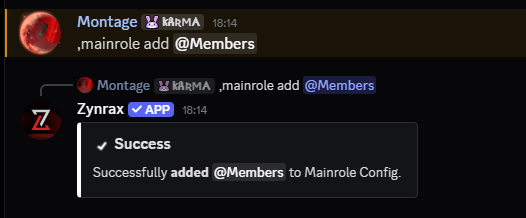
To begin protecting your roles, you can use the `mainrole add` command.
```bash Syntax theme={null}
,mainrole add (role)
```
```bash Example theme={null}
,mainrole add @Family
```
 ### Removing Roles
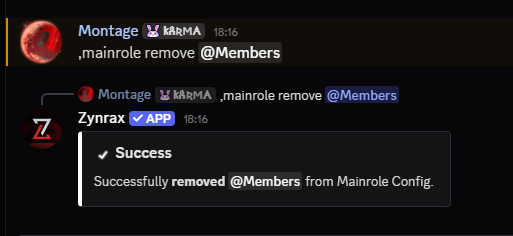
If you no longer wish to protect a specific role, you can remove it from the configuration.
```bash Syntax theme={null}
,mainrole remove (role)
```
```bash Example theme={null}
,mainrole remove @Family
```
### Removing Roles
If you no longer wish to protect a specific role, you can remove it from the configuration.
```bash Syntax theme={null}
,mainrole remove (role)
```
```bash Example theme={null}
,mainrole remove @Family
```
 Once a role is added to the Mainrole configuration, Zynrax will actively monitor every message for mentions of that role.
## Configuration Commands
Manage your protected role list with these simple commands.
### Viewing Protected Roles
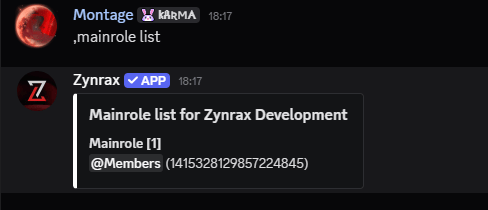
See exactly which roles are currently under Zynrax's instant-ban protection.
```bash Syntax theme={null}
,mainrole list
```
Once a role is added to the Mainrole configuration, Zynrax will actively monitor every message for mentions of that role.
## Configuration Commands
Manage your protected role list with these simple commands.
### Viewing Protected Roles
See exactly which roles are currently under Zynrax's instant-ban protection.
```bash Syntax theme={null}
,mainrole list
```
 ### Disabling the Module
If you need to disable role protection entirely, you can reset the configuration.
```bash Syntax theme={null}
,mainrole reset
```
### Disabling the Module
If you need to disable role protection entirely, you can reset the configuration.
```bash Syntax theme={null}
,mainrole reset
```
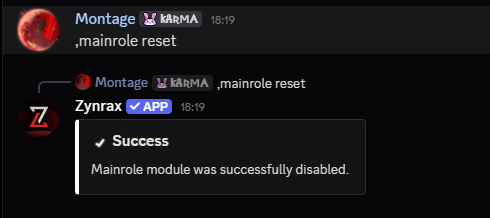 After a `reset`, none of your roles will be protected. Any user will be able to mention them without being banned by Zynrax.
## Whitelisting Users
If you want a specific user to be able to mention protected roles without being banned, you must add them to the security whitelist.
```bash Syntax theme={null}
,whitelist (user)
```
```bash Example theme={null}
,whitelist @Montage
```
After a `reset`, none of your roles will be protected. Any user will be able to mention them without being banned by Zynrax.
## Whitelisting Users
If you want a specific user to be able to mention protected roles without being banned, you must add them to the security whitelist.
```bash Syntax theme={null}
,whitelist (user)
```
```bash Example theme={null}
,whitelist @Montage
```
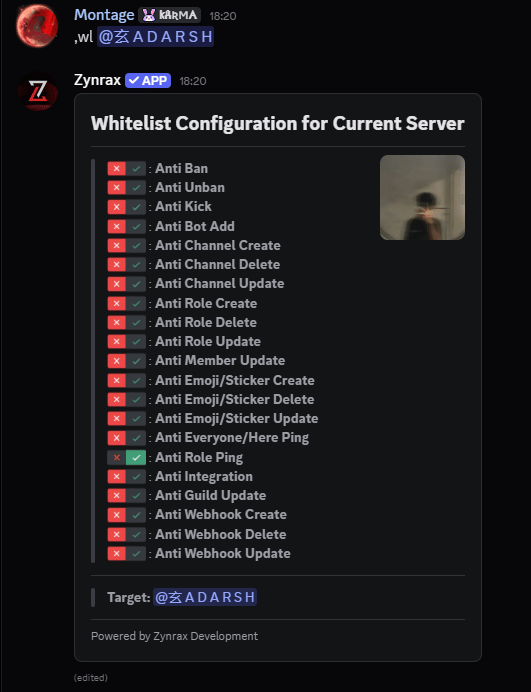 Whitelisting a user gives them total immunity from the Mainrole system. Only whitelist users you trust completely.
## Authorized Users
To prevent accidental bans of your own team, the following users are automatically exempt from Mainrole protection:
* **Server Owner**: Always allowed to mention any role.
* **Extra Owners**: Users who have been added to the `extraowner` list and have Administrator permissions.
* **Whitelisted Users**: Users who are on the general security whitelist.
Ensure your moderators are added to the **whitelist** if you want them to be able to mention protected roles during audits or announcements.
Whitelisting a user gives them total immunity from the Mainrole system. Only whitelist users you trust completely.
## Authorized Users
To prevent accidental bans of your own team, the following users are automatically exempt from Mainrole protection:
* **Server Owner**: Always allowed to mention any role.
* **Extra Owners**: Users who have been added to the `extraowner` list and have Administrator permissions.
* **Whitelisted Users**: Users who are on the general security whitelist.
Ensure your moderators are added to the **whitelist** if you want them to be able to mention protected roles during audits or announcements.